HTML Reports
The HTMLHyperText Markup Language reports are for humans. They are linked to each other: the build summary report links each test case’s detailed report, and each detailed report links its transcripts.
Wherever a triangle precedes a text in a report, a click on it hides or reveals further information.
Build Summary Report
The build summary report shows at a glance whether a build passed, and which test cases did not pass. It has three parts:
Test suites and test cases show further information, such as functional coverage and the count of disabled alerts.
The report is <BuildName>/<BuildName>.html, created by RUFF/osvvm/CreateBuildReports at the end of
a build. OpenBuildHtml opens it.
build ../OsvvmLibraries/RunDemoTests.pro
# creates OsvvmRunDemoTests/OsvvmRunDemoTests.html
OpenBuildHtml
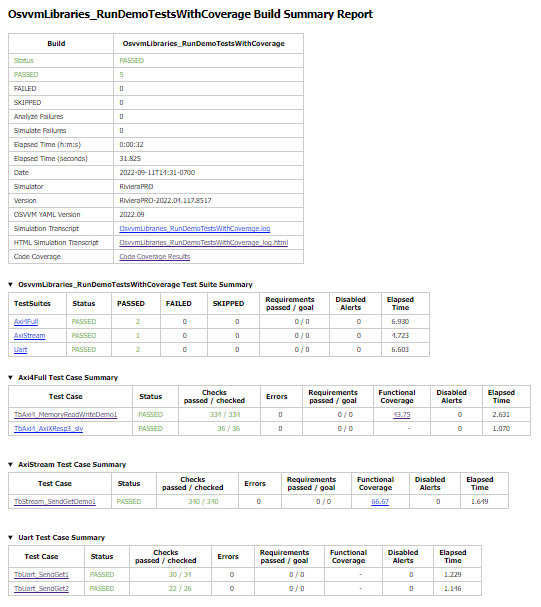
Build Summary Report
Build Status
The build status is the table at the top of the build summary report: the build’s result, the counts of passed, failed and skipped test cases, the analyze and simulate failures, the elapsed time and date, the simulator and its version, and links to the plain text and the HTML simulator transcript. If code coverage was collected, its last row links the code coverage report.
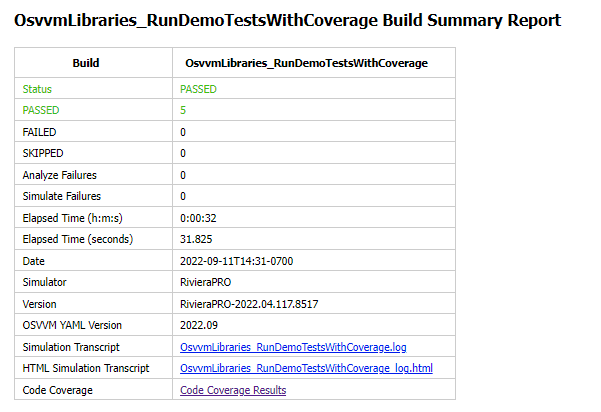
Build Status
Test Suite Summary
Test cases are grouped into test suites, and a build can contain several test suites. The test suite summary
has one row per test suite. The figure shows a build with the test suites Axi4Full, AxiStream and
UART.
TestSuite Axi4Full
...
TestSuite AxiStream
...
TestSuite UART
...
TestSuite starts a test suite.
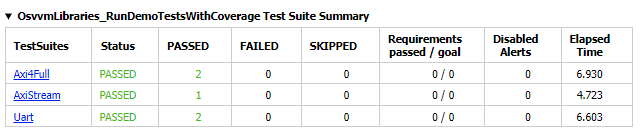
Test Suite Summary
Test Case Summary
The rest of the build summary report is a test case summary per test suite: one row per test case, with its result, its checks and alerts, its functional coverage and a link to its detailed report. Test cases skipped with SkipTest are listed with their reason.
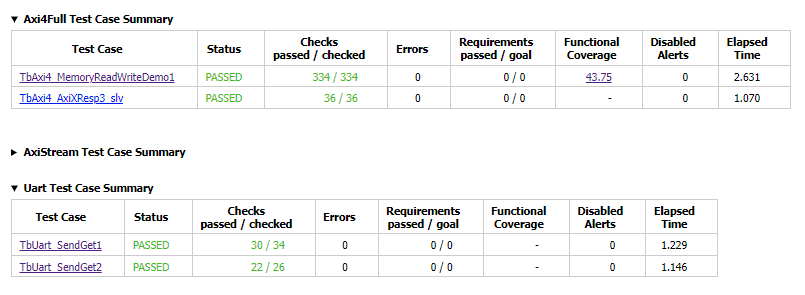
Test Case Summary
Test Case Detailed Report
Each simulated test case gets a detailed report with:
Functional Coverage Reports, one per coverage model
links to the test case transcripts and to the test case in the HTML simulator transcript
The report is <BuildName>/reports/<TestSuite>/<TestCaseFileName>.html, created by
RUFF/osvvm/Simulate2Html after the simulation, from the YAMLYAML Ain't Markup Language files the test case wrote with
EndOfTestReports. <TestCaseFileName> is the test case name, followed by _<Generic>_<Value> for each
generic set with generic, so each generic variant of a test case has its own report.
TestSuite UART
RunTest   TbUart_SendGet1.vhd
# creates
#   reports/UART/TbUart_SendGet1.html

simulate  TbUart [generic Baud 115200]
# creates
#   reports/UART/TbUart_Baud_115200.html
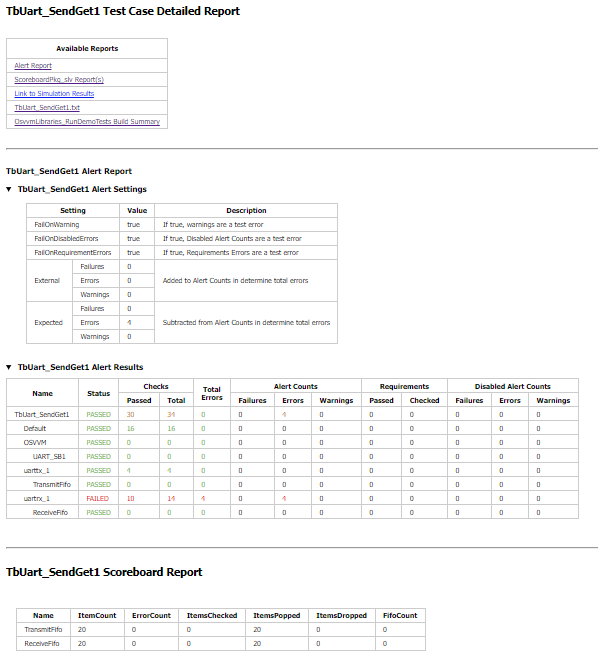
Test Case Detailed Report
Test Information Link Table
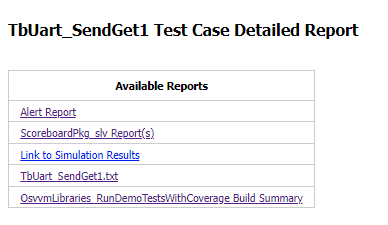
The table at the top of the detailed report links to the alert report, the functional coverage reports and the
scoreboard reports in the same file, to the test case’s results in the HTML simulator transcript, and to the
transcript files the test case opened with TranscriptOpen. It also lists the generics of the simulation.
Test Information Link Table
Alert Report
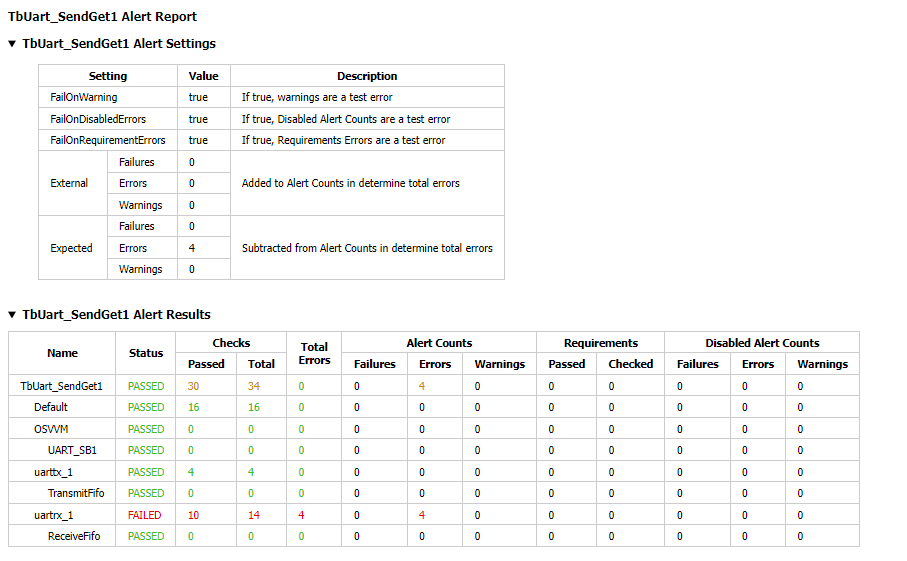
The alert report shows each AlertLogID used in the test case, with its checks and its counts of errors, failures
and warnings. Expected errors still show as FAILED in the alert report; the total error count accounts for them.
RUFF/osvvm/Alert2Html writes this part of the report.
Alert Report
Functional Coverage Reports
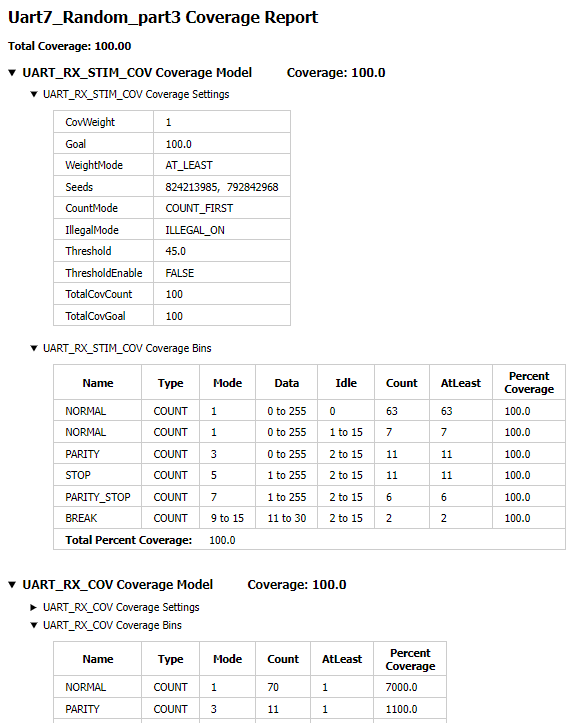
The detailed report contains a functional coverage report for each coverage model of CoveragePkg used in the test
case: its bins, their goals and counts, and the coverage reached. RUFF/osvvm/Cov2Html writes this part. The
figure is not from the demo.
Functional Coverage Report
Scoreboard Reports
The scoreboard report has one row for each scoreboard of ScoreboardGenericPkg used in the test case: its item count,
the items checked, popped and dropped, the items still in its FIFOfirst in, first out, and the errors found.
RUFF/osvvm/Scoreboard2Html writes this part.
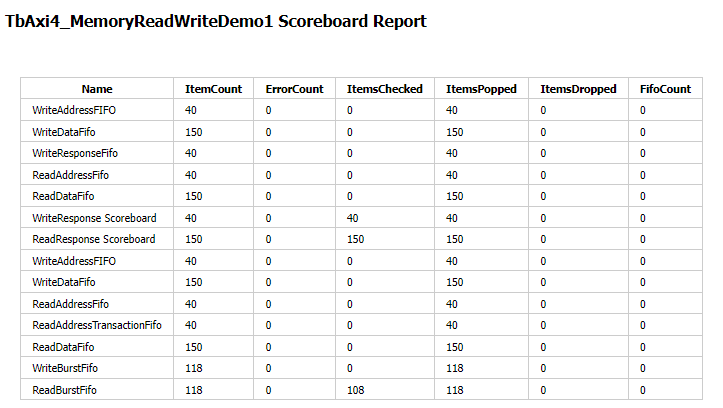
Scoreboard Report
Test Case Transcript
OSVVMOpen Source VHDL Verification Methodology’s transcript utility collects the output of a test case - its own messages and those of
OSVVM’s utility library - into one file. TranscriptOpen opens it; without a file name, it is
<TestName>.log.
After the simulation, the scripts move the file into <BuildName>/results/<TestSuite>/ and create an HTML
version of it with RUFF/osvvm/Transcript2Html. The detailed report links both.
TestProc : process
begin
  SetTestName("TbUart_SendGet1") ;
  TranscriptOpen ;  -- TbUart_SendGet1.log
  . . .
  EndOfTestReports ;
  TranscriptClose ;
  std.env.stop ;
end process TestProc ;
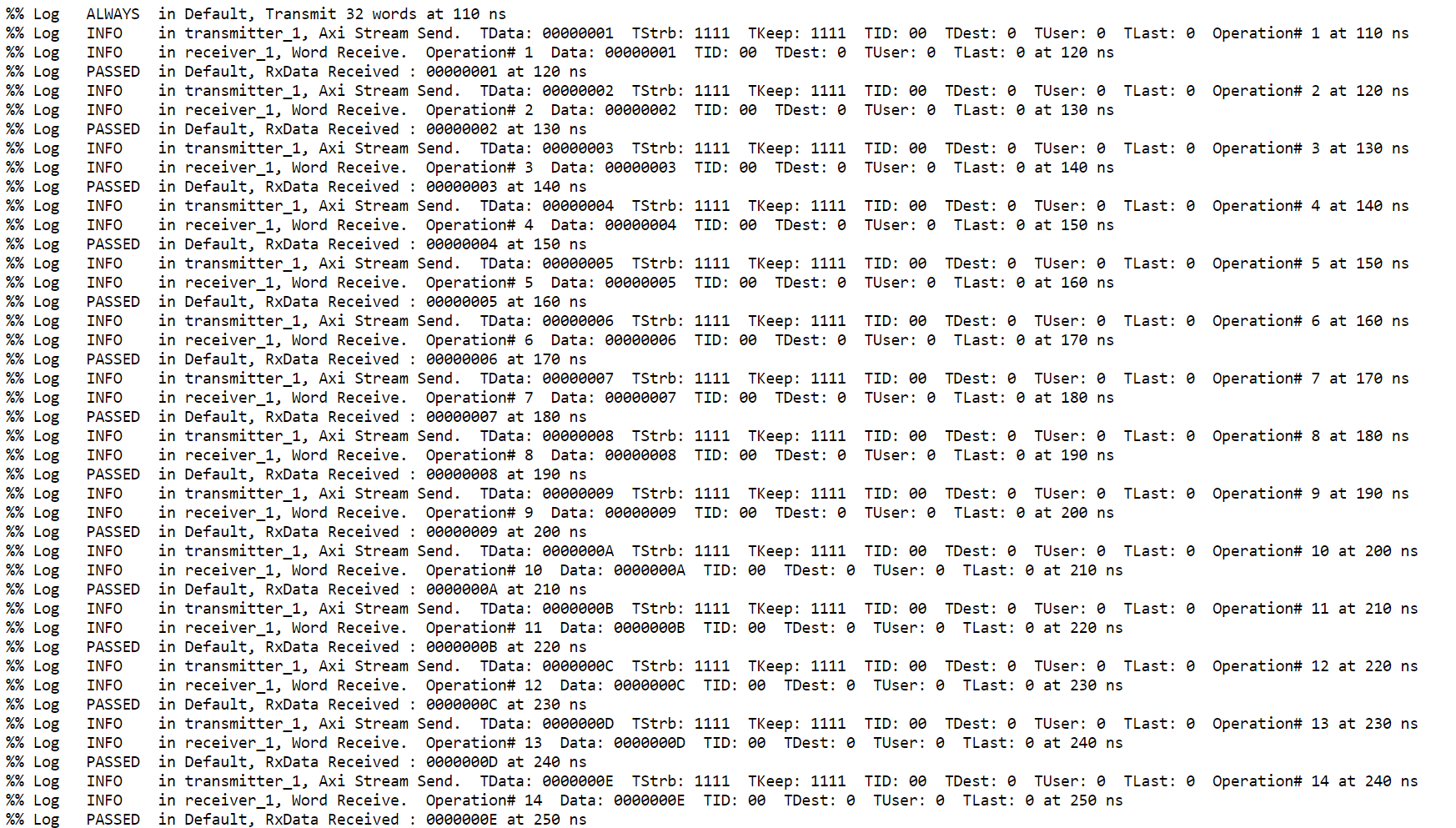
Test Case Transcript
HTML Simulator Transcript
The simulator transcript of a build can be long: the OSVVM regression RunAllTests.pro writes a log file of
84,000 lines. As plain text, it isn’t browsable; as HTML, it is: each test case’s output can be collapsed and
expanded.
The scripts always write the plain text transcript logs/<BuildName>.log. With the transcript type html
(default), RUFF/osvvm/Log2Osvvm converts it into logs/<BuildName>_log.html at the end of the
build. SetTranscriptType selects html, log (plain text only) or none.
# in OsvvmSettingsLocal.tcl or a script
SetTranscriptType html    ;# default
SetTranscriptType log     ;# plain text only
GetTranscriptType
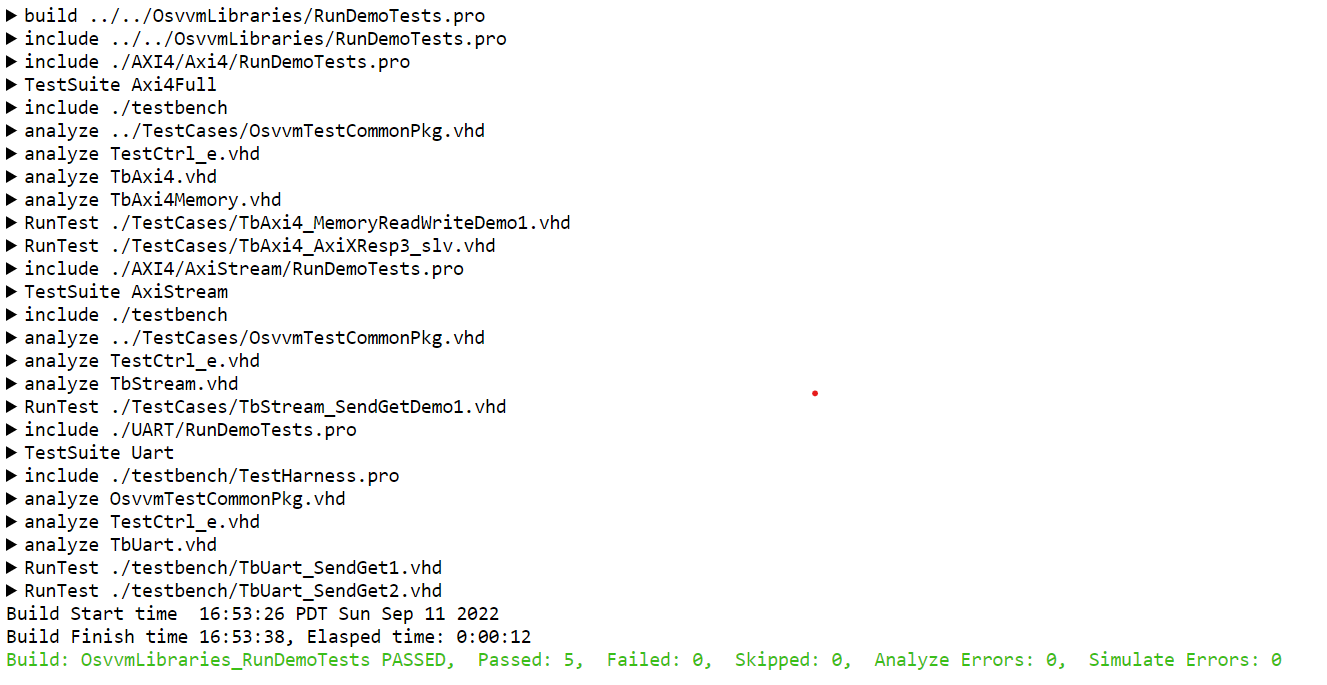
HTML Simulator Transcript
Code Coverage Report
With code coverage enabled, the simulator collects code coverage for each test case. The coverage of the test cases is merged at the end of each test suite, and the coverage of the test suites at the end of the build. The simulator then writes its own HTML code coverage report, which the build status links.
Code coverage is enabled for analyze and for simulate separately, so the testbench can be left out: SetCoverageAnalyzeEnable, SetCoverageSimulateEnable. By default, statement, branch and state machine coverage is collected; SetCoverageKinds selects other kinds (see Code Coverage).
The databases and the report are in <BuildName>/CodeCoverage/. Their format depends on the simulator;
NVC writes <BuildName>_code_cov/index.html.
Besides the HTML report, the code coverage can be exported into a well-known data format for CIcontinuous integration tools: Cobertura XML for NVC, the simulator’s XMLExtensible Markup Language for the Siemens and Aldec tools. ExportCodeCoverage exports the last build; SetCoverageExportEnable exports at the end of every build (see Exporting Code Coverage).
# File name: Dut.pro
SetCoverageAnalyzeEnable  true
analyze   Dut.vhd
SetCoverageAnalyzeEnable  false

SetCoverageSimulateEnable true
analyze   TbDut.vhd
simulate  TbDut
SetCoverageSimulateEnable false

# after the build: Cobertura XML (NVC)
ExportCodeCoverage
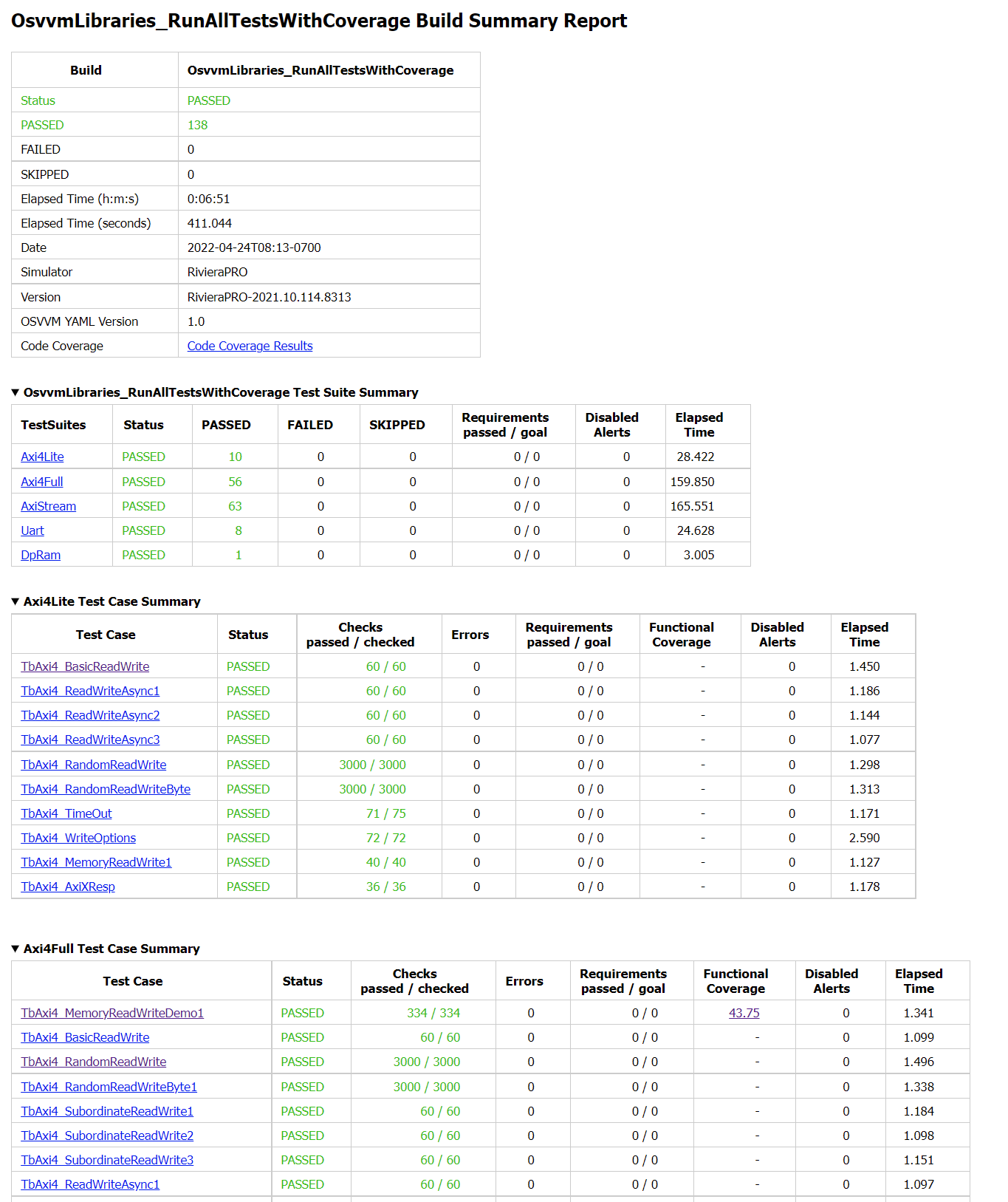
Build Summary Report with a link to the code coverage report
Build Index
Each build is also recorded in index.yml, in the directory that contains the build directories.
RUFF/osvvm/Index2Html writes index.html from it at the end of each build: one row per build,
newest first, with its result and counts, linked to its build summary report.
OpenIndex opens it.
Version:    "0.1"
Builds:
  - Name:     "OsvvmRunDemoTests"
    Directory:           "OsvvmRunDemoTests"
    Status:              "PASSED"
    Passed:              11
    Failed:              0
    Skipped:             0
    ...